Day 3: One prompt, twenty-five searches — keyword expansion with Gemini
Chunk-numbering note: Day 2 teased "chunk 4 = keyword expansion" and "chunk 5 = relevance check". Renumbered to keep one chunk per day, so what was chunk 4 is now chunk 3, and so on. Margin calc gets bumped to chunk 7 — quality of which product is a different problem from economics of how much you'd make.
1. Where Day 2 left us — and the problem it exposed
Yesterday's win was the wire: a prompt comes in on Shopify, a workflow runs on GitHub Actions, a JSON file with twelve AliExpress products lands on main. Fourteen seconds from button to commit.
Yesterday's loss was the data. I typed iphone 18 replica as a test prompt and the top hit was this:

iphone 18 replica: the SERVO A50 PRO foldable flip phone. The Day 2 article calls this out — "the wire works, the data does not". It's the problem the next few chunks (this one included) attack.The single-prompt search has two structural problems, not one:
- Vocabulary mismatch. A shopper types
blue kids pants. The shelf with the best margin is probably listed by the supplier asboys denim trousersorchildren jeans. We never see it — AliExpress ranks listings by keyword overlap with the literal query. - Single-page ceiling. Even the perfect query shows only what fits above the fold of the first page. Lots of good listings sit on pages 2–10 with the same keywords; we never reach them.
Both problems shrink the candidate pool the rest of the pipeline has to work with. Today's chunk doesn't solve relevance (that's chunk 4, when an LLM filters out the foldable flip phone). Today's chunk grows the pool — wider net, more raw material, then later chunks throw the bad stuff back.
Three ways to widen the net (and why I picked one)
| Option | How it works | Why not / why yes |
|---|---|---|
| A. Pagination | Walk pages 2-10 of the same query, dedupe by product_id. | Doesn't fix vocabulary mismatch. Page 7 of "blue kids pants" is still ordered by the same ranker for the same words. |
| B. Synonym dictionary | Hand-maintained word list: kids→children→toddler, pants→trousers→jeans... | Combinatorial blow-up; needs constant tending; biased by whoever wrote it. |
| C. LLM expansion | Ask a small model to fan one prompt into ~25 plausible search variants. | Cheap, automatic, biased only by training data. Handles synonyms, sibling categories, and common misspellings the same way a real shopper would. Picked. |
2. Picking the LLM — why Gemini Flash specifically
Keyword expansion is the kind of task small models are great at: the output is short, structured, and verifiable. There's no chain-of-thought, no tool use, no long-form generation. A frontier model would be overkill and slow. So the candidate set was the small-and-fast tier:
| Model | Free tier? | Cost (input/output, per 1M tokens) | Why I didn't pick it |
|---|---|---|---|
| Gemini 2.5 Flash | 1,500 req/day, ~1M tokens/min | $0.075 / $0.30 once you exceed free tier | Picked. |
| GPT-4o-mini | No (small free credits on signup only) | $0.15 / $0.60 | No always-free tier — fork-and-run breaks for anyone without an OpenAI account. |
| Claude Haiku 4.5 | No (Anthropic SDK has free trial credits only) | $1.00 / $5.00 | Same problem + an order of magnitude more expensive for this workload. |
| Self-hosted (Llama, Qwen, etc.) | Free | GPU rental or local box | Would need a GPU somewhere. Breaks the "no infrastructure" story from chunk 2. |
Gemini 2.5 Flash hits the three things this chunk actually needs. Each one matters more than it sounds:
- Free forever, not just trial credits. Margeen is a public-repo build-in-public project. If a reader forks wiswes/margeen and tries to run the workflow, they need to get a key in 30 seconds without entering a credit card — otherwise the "zero infra cost" story from chunk 2 breaks the moment they hit Day 3. Gemini's free tier (1,500 requests/day, 1 million tokens/minute) is the only mainstream LLM that meets that bar today.
- Cost math even if you exceed the free tier. One expansion call sends ~50 tokens of prompt and gets back ~250 tokens. At Gemini's paid prices that's
(50 × 0.075 + 250 × 0.30) / 1,000,000 ≈ $0.000079per search. You could run a search a minute, every minute, all month, for under $4. The cost stops being a real number; the rate limit on the AliExpress side will hurt you first. - JSON mode (
responseMimeType). Gemini, OpenAI, and Anthropic all support a "return only valid JSON" mode. With it on, the response body is guaranteed to be JSON I canjson.loadsdirectly — no regex stripping of```jsonfences, no hallucinated "Here's your list:" preamble. This matters disproportionately for short structured tasks. (More on this in the next section.) - Stdlib-only client. No SDK. The Gemini REST endpoint is a single POST to a JSON URL. The script already shells out to
curlfor AliExpress; for Gemini I usedurllib.requestfrom the Python stdlib. Sorequirements.txtstays empty. - Latency is low enough to ignore. Flash typically returns in 400–800 ms for a request this small. The fetch loop (25 AliExpress fetches in parallel) is the cost centre, not the expansion — even doubling the LLM call would barely show up in the total wall time.
Setup, for anyone forking: get a key at aistudio.google.com/apikey (no card needed), add it to the repo as a secret named GEMINI_API_KEY, wire it as an env var in the workflow. Forks without the secret are not broken — the script logs GEMINI_API_KEY not set — skipping expansion and falls back to the Day-2 single-prompt search.
3. The expander — prompt design and the parsing it enables
Prompt engineering for tiny structured tasks is a different sport from prompt engineering for chat. Three things matter: the rules in the prompt, the response format constraint, and the post-processing that catches the model being almost-right.
The prompt, with annotations
# scripts/search_aliexpress.py — expand_keywords()
user_prompt = (
    f'Generate up to {MAX_VARIANTS} short AliExpress search-query '
    f'variants a shopper might type to find this: "{prompt}".\n\n'
    "Rules:\n"
    "- Each variant 1-5 words, lowercase, no punctuation.\n"
    "- Include synonyms, common misspellings, sibling categories, "
    "brand-name variants.\n"
    "- No questions, no sentences, no duplicates of the original.\n"
    "- Return ONLY a JSON array of strings. No prose, no code fence."
)
Each line was added because of a specific failure I saw in early runs:
| Rule | What goes wrong without it |
|---|---|
| "a shopper might type" | Without it, you get marketing-flavoured variants — "premium denim collection for children" — that no real AliExpress search box ever sees. |
| 1–5 words | LLMs love to be helpful. Long variants ("comfortable dark blue jeans for boys aged 4 to 12") return zero matches because no listing repeats that whole phrase verbatim. |
| lowercase, no punctuation | AliExpress search is case-insensitive but the URL encoding for commas / quotes is messy. Normalising up front makes downstream dedupe trivial. |
| synonyms, misspellings, sibling categories, brand variants | Naming the categories explicitly nudges the model to fan out instead of returning 25 paraphrases of the same noun. |
| no questions, no sentences, no duplicates | Negatively scoped rules. Without them you get "what are blue kids pants" and the original prompt verbatim taking up slots. |
| Return ONLY a JSON array | Combined with response-format=JSON below, makes the parser a one-liner. |
JSON mode: the unsexy parsing win
The request includes responseMimeType: "application/json" in generationConfig. That instructs Gemini to constrain decoding to valid JSON tokens — not as a soft prompt instruction ("please return JSON") but at the sampler level. The response body is guaranteed parseable.
body = json.dumps({
    "contents": [{"role": "user", "parts": [{"text": user_prompt}]}],
    "generationConfig": {
        "temperature": 0.7,            # warm enough for variety, not so
                                       #   warm it invents fake products
        "responseMimeType": "application/json",
    },
}).encode("utf-8")

req = urllib_request.Request(
    f"{GEMINI_ENDPOINT}?key={api_key}",
    data=body,
    headers={"Content-Type": "application/json"},
    method="POST",
)
with urllib_request.urlopen(req, timeout=timeout) as r:
    response = json.loads(r.read().decode("utf-8"))
text = response["candidates"][0]["content"]["parts"][0]["text"]
raw = json.loads(text)   # <-- parses cleanly, no regex strip needed
Without JSON mode you spend at least one debugging round on a response like ```json\n[...]\n``` or Sure! Here are 25 variants: [...]. With JSON mode the worst case is a syntactically-valid empty list, which the caller can detect cleanly.
Temperature 0.7 — not 0, not 1
Temperature 0 makes every call deterministic, which sounds nice for tests but produces nearly identical lists for similar prompts — the variety I want comes from sampling, not from re-prompting. Temperature 1 starts inventing brand names that don't exist. 0.7 is the sweet spot for "diverse but plausible" outputs on short structured tasks.
Defensive normalisation
Even with JSON mode and clear rules, the model occasionally: leaves trailing whitespace, uppercases the brand-name variants ("Apple iPhone"), returns the original prompt as one of the items, or duplicates two near-identical entries ("blue kids pants" vs "blue kids' pants" — the apostrophe is the only difference). The post-processor handles all of those without complaining:
seen: set[str] = set()
cleaned: list[str] = []
for item in raw:
    if not isinstance(item, str):
        continue
    v = re.sub(r"\s+", " ", item).strip().lower()
    if not v or v == prompt.lower() or v in seen:
        continue
    cleaned.append(v)
    seen.add(v)
return base + cleaned[: MAX_VARIANTS - 1]
Three things are happening: whitespace collapse + strip + lower (canonical form), dedupe via a seen set, and the cap at MAX_VARIANTS - 1 because the original prompt is always variant #0 (so the total fanout — including the unchanged prompt — never exceeds 25).
Failure as a first-class state
The function always returns a non-empty list. No key, API error, timeout, malformed JSON — all of them produce the single-element fallback [prompt]. Downstream code never branches on "did expansion work?"; it just loops over whatever list it got. This matters for the public workflow — a fork without the secret behaves identically to Day 2's single-prompt search, no extra code paths.
def expand_keywords(prompt: str, timeout: int = 20) -> list[str]:
    base = [prompt]
    api_key = os.environ.get("GEMINI_API_KEY", "").strip()
    if not api_key:
        print("[margeen] GEMINI_API_KEY not set - skipping expansion")
        return base
    # ... build request ...
    try:
        with urllib_request.urlopen(req, timeout=timeout) as r:
            response = json.loads(r.read().decode("utf-8"))
    except (urllib_error.URLError, TimeoutError, json.JSONDecodeError) as e:
        print(f"[margeen] expansion API error: {e} - falling back")
        return base
    # ... parse + normalise (above) ...
    return base + cleaned[: MAX_VARIANTS - 1]
What Gemini actually returned
For the headline blue kids pants run, the 25-variant list looked like this (extracted from latest.json):
# Synonyms for "kids"
blue toddler pants     blue baby pants      blue children pants
blue youth pants       kids blue jeans      toddler blue jeans

# Synonyms for "pants"
blue kids trousers     blue kids leggings   blue kids joggers
blue kids sweatpants   blue children trousers
blue children joggers  children blue bottoms

# Gender variants
blue boy pants         blue girl pants      boys blue jeans
girls blue jeans       boy blue trousers    girl blue trousers
kids blue bottoms

# Shade variants
dark blue kids pants   light blue kids pants
navy kids pants        denim kids pants
Four buckets, all plausible, all distinct from the original — and all (in principle) hitting different ranking shelves on the AliExpress side. That's the model earning its keep.
4. Twenty-five searches without burning a minute
Day 2's single fetch took ~14 seconds. Naively, 25 fetches in series is 350 seconds. A six-minute search is dead on arrival — GitHub Actions queues other runs behind it, the Shopify Flow timeout fires, the article gets boring to read.
The Python standard library has ThreadPoolExecutor, which is exactly what this needs: each fetch is I/O-bound (curl waiting on the network), the GIL is not in the way, and there's no setup beyond a context manager.
from concurrent.futures import ThreadPoolExecutor, as_completed

MAX_PARALLEL_FETCHES = 8

records = []
with ThreadPoolExecutor(max_workers=MAX_PARALLEL_FETCHES) as pool:
    futures = {pool.submit(search_variant, v): v for v in variants}
    for fut in as_completed(futures):
        records.append(fut.result())
Each variant's fetch is wrapped in search_variant()which catches its own exceptions and returns a record — so one flaky variant can't take down the whole run.
5. New JSON shape (v2)
The output schema is now margeen.search/v2. Three things changed:
expansionblock. Records whether expansion was on, which model produced the variants, and how many variants were fetched.variants[]array. One record per search variant: keyword, HTTP status, response bytes, blocked flag, error string if any, candidate count. The audit trail for "why this product was, or wasn't, in the result".seen_inon every candidate. Which variant(s) surfaced this product. When two variants surface the same product_id, that signals stronger relevance — chunk 4 will use this.
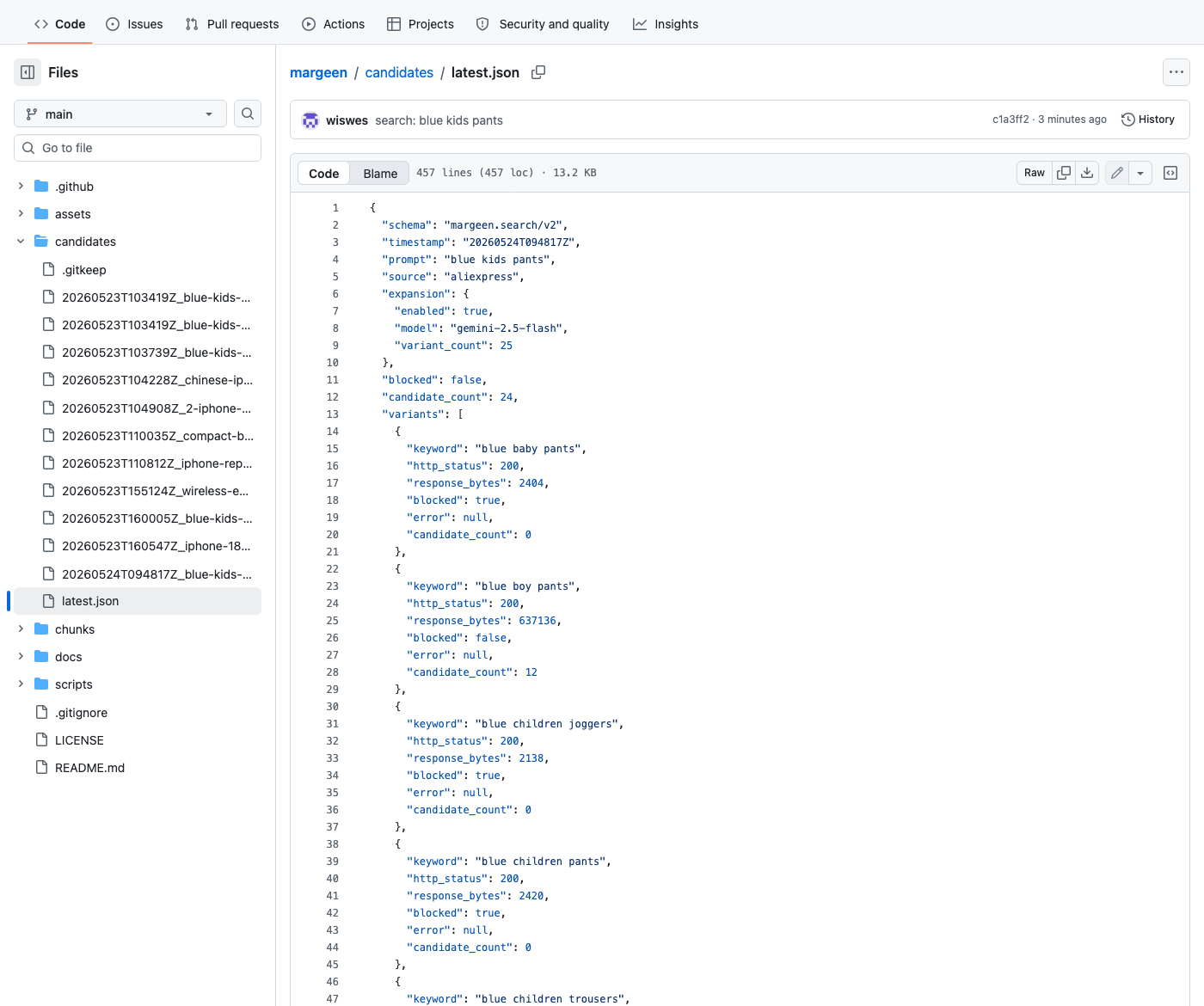
candidates/latest.json. The variants array makes the rest of the article more or less write itself — you can read the result of every individual search and decide what to do about it.6. The first real run
Prompt: blue kids pants (same as Day 2's headline run, so the numbers are comparable). Gemini returned 25 variants — synonyms (blue toddler pants), siblings (boys blue jeans), category-shifts (navy kids pants, blue children joggers). The fetcher fanned out.
73dc516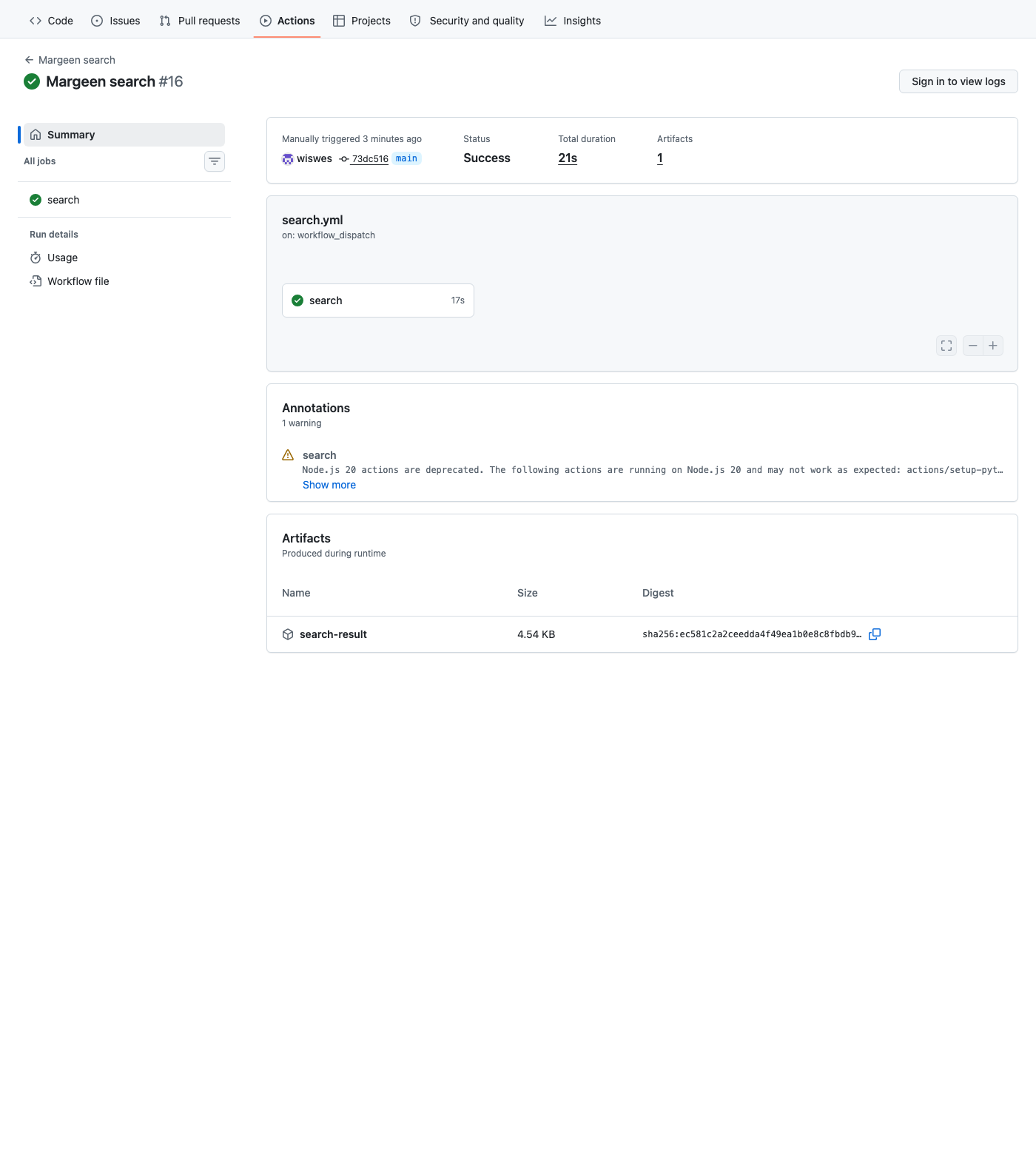
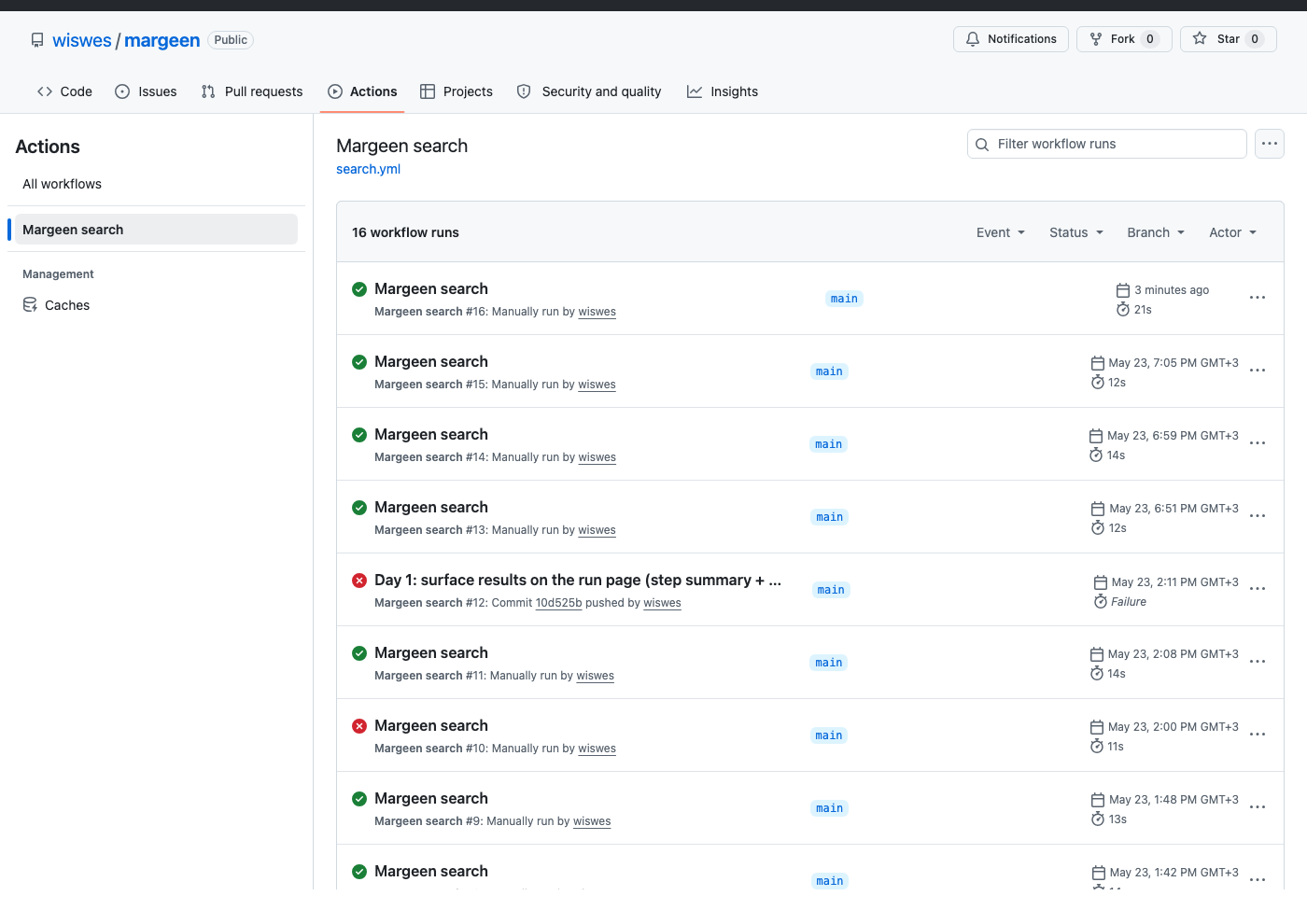
7. Twenty-three of twenty-five got bot-blocked
Reading the variants[] array of that run is sobering. Two variants returned ~600 KB of real product HTML (blue boy pants, blue children trousers). The other twenty-three returned ~2 KB each: AliExpress's anti-bot interstitial.
| Status | Variants | What it means |
|---|---|---|
| ✓ Real HTML | 2 of 25 | 12 candidates each, no overlap → 24 unique products |
| ✗ 2 KB bot page | 23 of 25 | Caught correctly by looks_blocked() — recorded, not garbage |
AliExpress's anti-bot fired because GitHub Actions runs on a small range of US IPs, and the script just hit it with 25 requests in five seconds. From the server's side, that's a textbook crawler signature. The first two got through; everything after that hit the captcha wall.
And yet: the expansion still doubled the candidate count vs Day 2, because the 2 variants that did get through had non-overlapping results. The mechanism works; the rate at which it works is the next problem.
8. Read every result on GitHub
Every Margeen search writes a JSON file to the repo on main. The git history is the audit log. Three places to look:
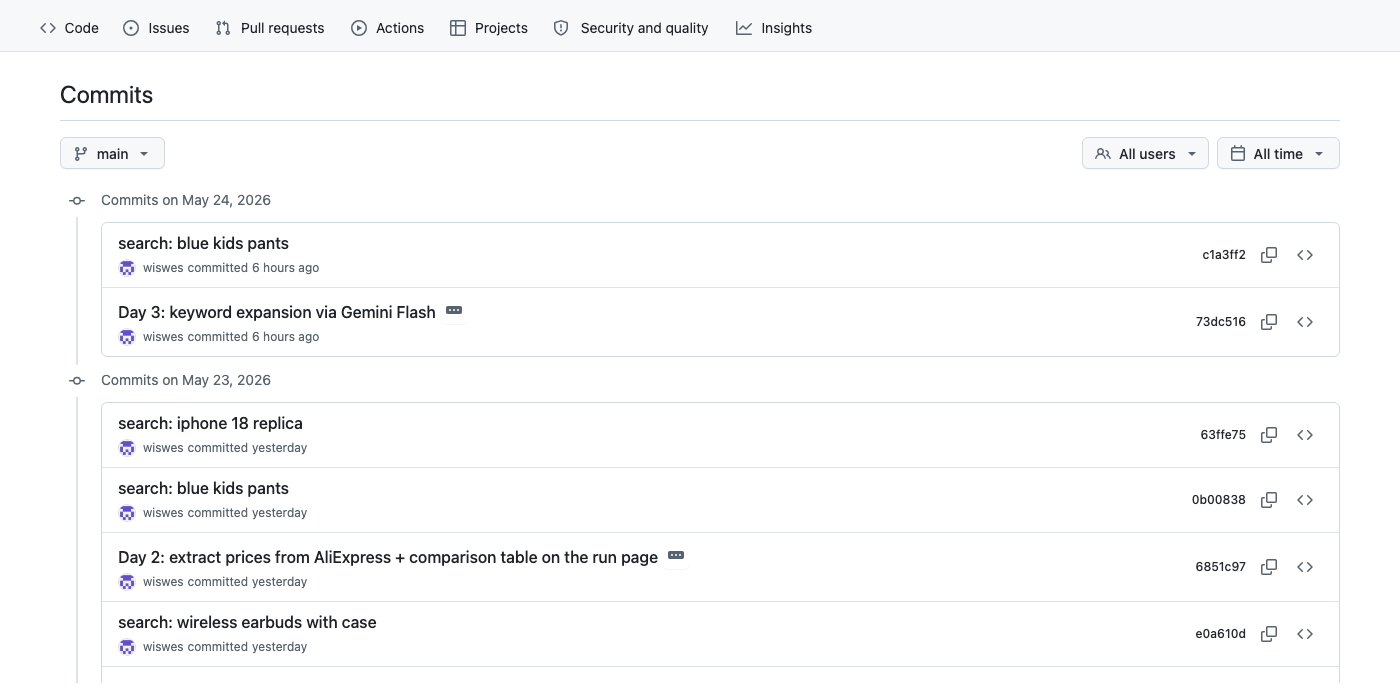
main after Day 3. 73dc516 is the code change. The next commit (c1a3ff2, "search: blue kids pants") was pushed by the workflow itself — the agent committing its own findings. Every search appears as one commit; the repo is the database.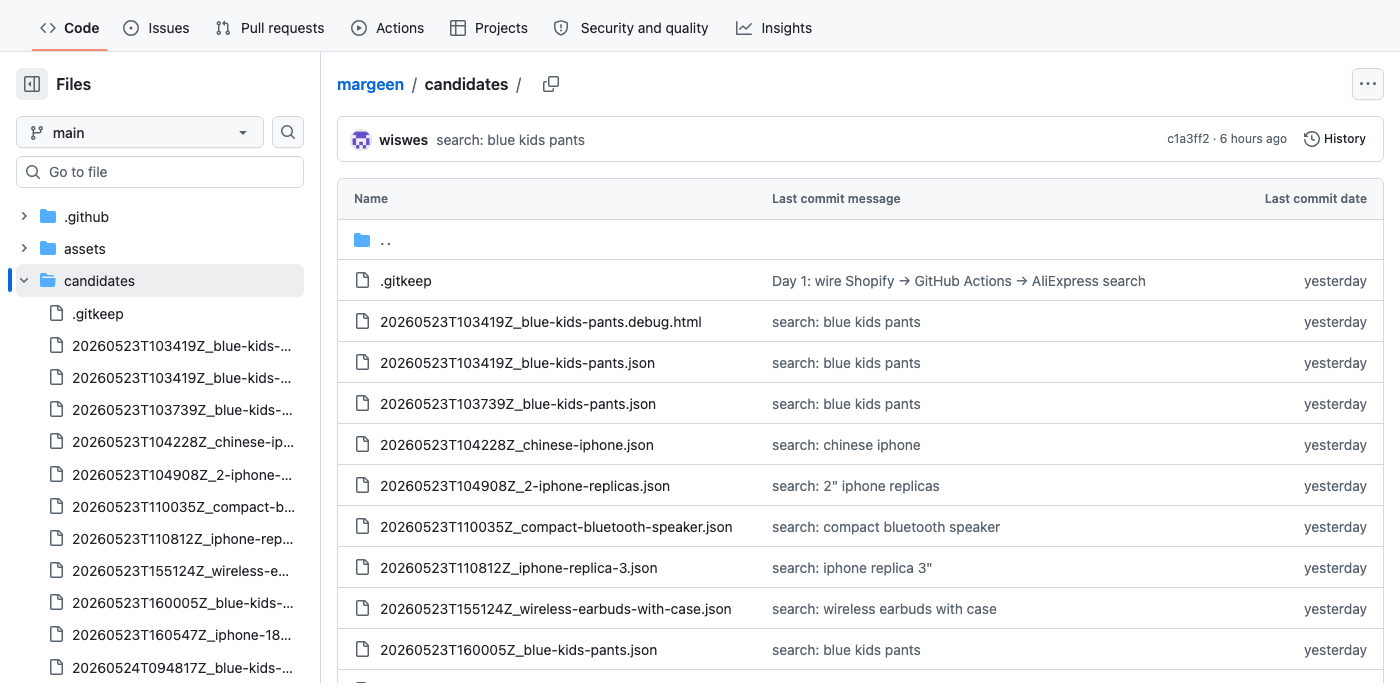
candidates/ folder keeps the last ten runs. candidates/latest.json is a stable pointer for "just give me the most recent result". A .debug.html file gets dropped alongside the JSON when a fetch was bot-blocked, so the raw response is recoverable.Want to run a search yourself? Fork wiswes/margeen, open the Actions tab on your fork, click Margeen search → Run workflow, type any prompt, hit run. Without a Gemini key it does Day-2 single-prompt search; with a key (yours, added as GEMINI_API_KEY in repo Secrets) you get the full 25-variant fanout.
9. What lands tomorrow
Two threads:
- Chunk 3.5 (small fix): stagger fetches. ThreadPool with
max_workerscapped lower (maybe 2), plus a small jitter between requests. The goal is to look less like a crawler from AliExpress's side — turning 23 blocked into 0–3 blocked. That's probably one commit, not a chunk of its own. - Chunk 4 (relevance check): the planned next chunk. Once the candidate pool is genuinely fuller, an LLM reads
{prompt, title}for each candidate and drops the ones that don't match — the SERVO A50 PRO finally gets filtered out ofiphone 18 replica.