All features

Ratings & feedback

An AI assistant you can’t measure is one you can’t improve. WisWes lets shoppers rate the conversation and react to individual answers, so you see exactly where the assistant delights — and where it falls short.

Shoppers rate the chat; you see it in the dashboard.

What it does

Shoppers give the conversation a 5-star rating and can thumbs-up or thumbs-down any single answer, right in the chat.

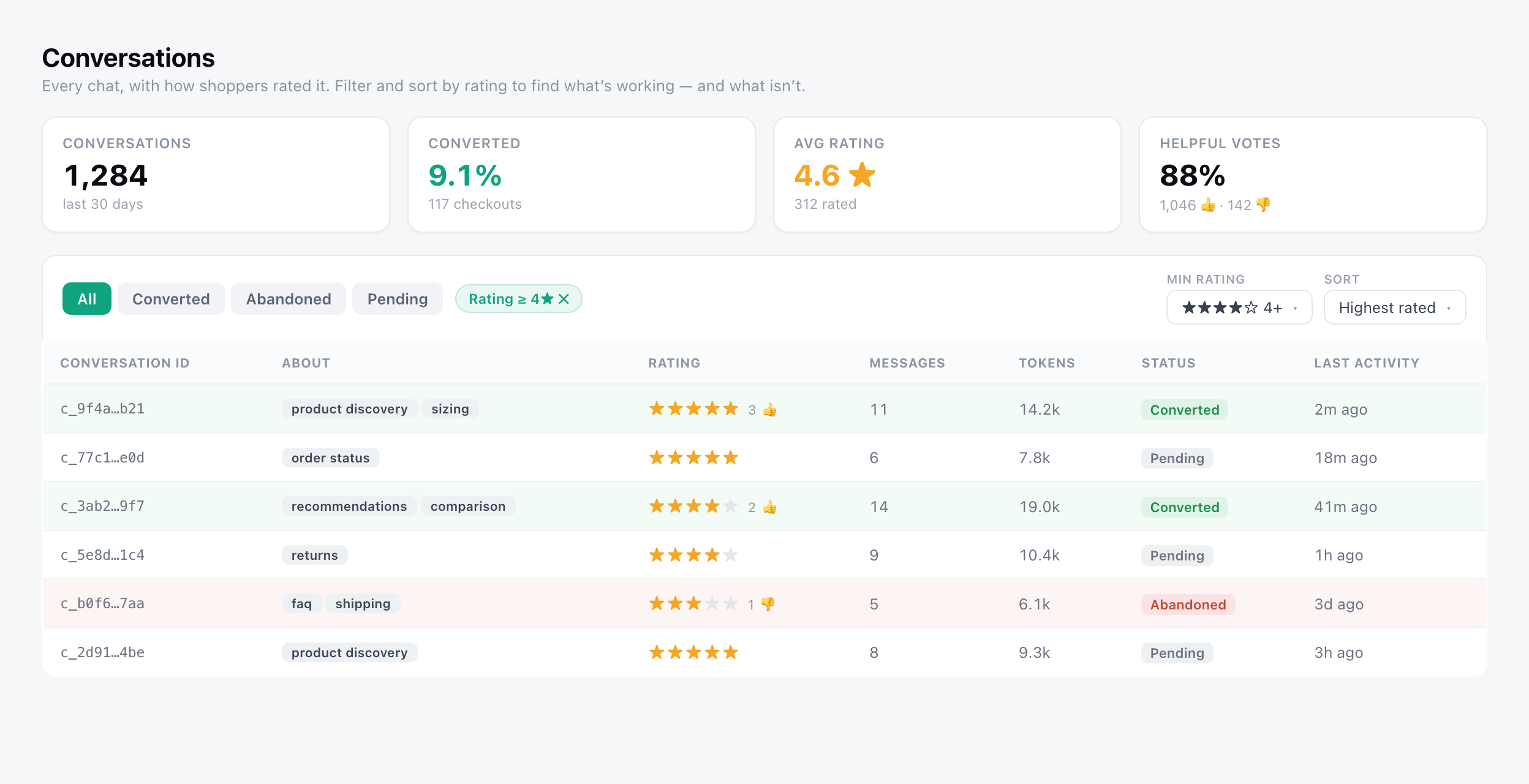
Every rating flows into the dashboard: an average-rating card on the overview, a Rating column and helpful/unhelpful counts on each conversation, and filters to sort by highest or lowest rated.

What you get

  • 5-star conversation rating + per-message thumbs
  • Average-rating card on the dashboard overview
  • Rating column and helpful/unhelpful counts in Conversations
  • Filter by minimum rating, sort by highest or lowest rated
  • The intent (“About”) shown next to the rating, so you see which topics score worst
See it in the dashboard

app.wiswes.com/conversations
Conversations with a Rating column, average-rating card, a minimum-rating filter and highest/lowest-rated sort.

Frequently asked questions

How do shoppers rate a conversation?

They give a 5-star rating in the chat, and can separately thumbs-up or thumbs-down any individual answer.

Where do I see the ratings?

In the dashboard — an average-rating card on the overview, plus a Rating column and helpful/unhelpful counts on every conversation in the Conversations view.

Can I find the worst-rated chats quickly?

Yes. Filter by minimum rating and sort by lowest rated to jump straight to the conversations that let shoppers down, then fix the prompt, FAQ or flow behind them.

Is rating required for shoppers?

No — it’s optional. WisWes only reports on the conversations that were actually rated.

Put this feature to work.

Start a 14-day free trial of WisWes — no credit card, cancel anytime. Or see the plans first.